Remove what doesn't belong.
Point out what does.

Inkwipe erases signs, logos and clutter from your photos with AI, then lets you add numbered steps, arrows, spotlights and text. One free Windows app, no uploads.

Free · Windows 10 and 11 · Works offline · No account · No watermark

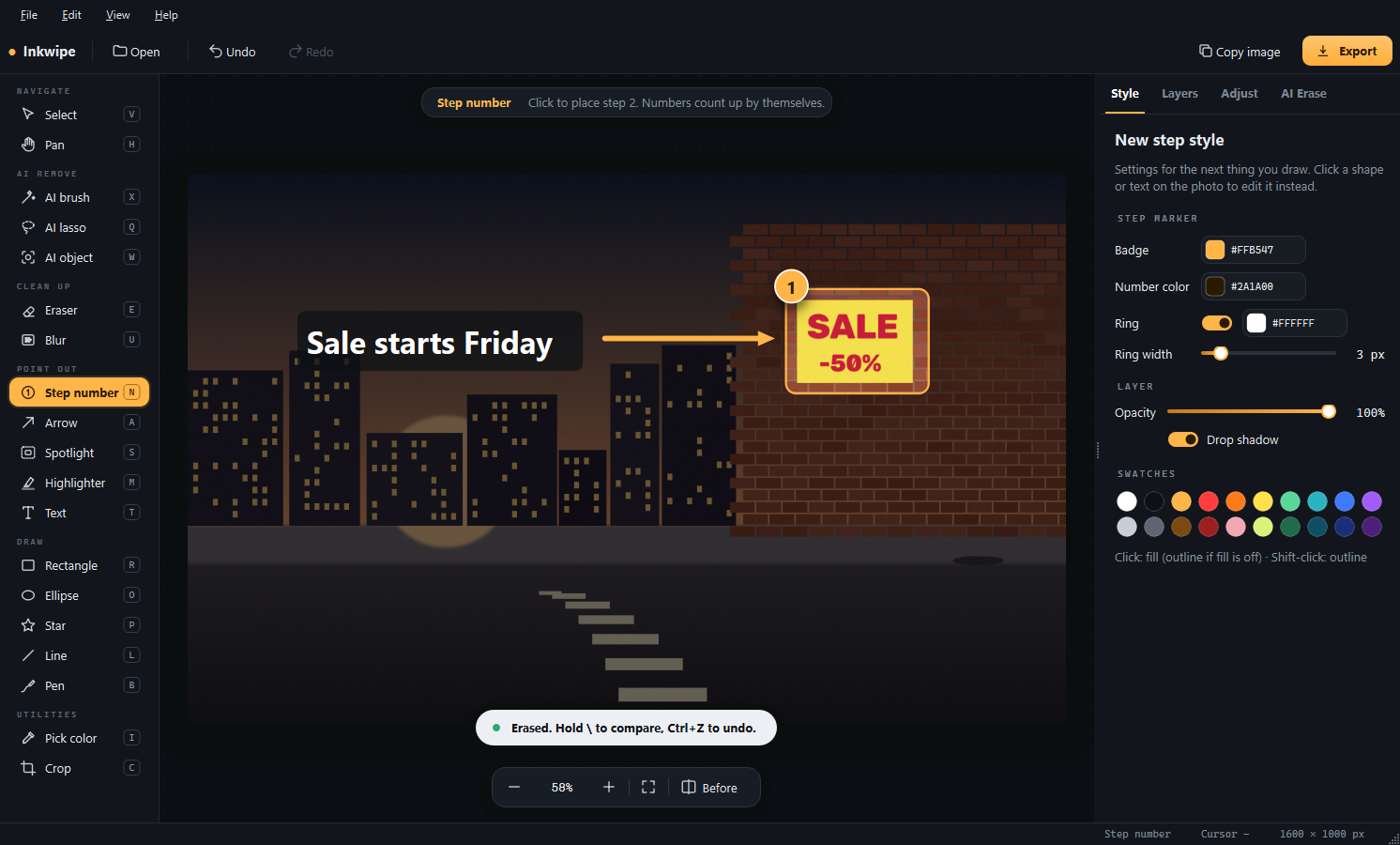
After: the parking sign is removed and the sale poster is highlighted with a spotlight, a numbered step, an arrow and a caption Before: a street photo with a no-parking sign in front of a brick wall BeforeAfter

Two jobs, one app

Other tools either clean photos or mark them up. Inkwipe does both, so a photo goes from messy to explained in under a minute.

✦

AI object removal

Drag a box around a sign or person and the outline is found for you. The gap is rebuilt from the scene around it.

1

Numbered steps

Click, click, click: badges count 1, 2, 3 by themselves. Built for work instructions and how-to guides.

◎

Spotlight & arrows

Dim everything except what matters, then point at it. Arrows, lines and a highlighter included.

T

Text that reads

Any font on your PC, background boxes and outlines. Arabic and right-to-left text supported.

▦

Blur faces & plates

Pixelate or blur names, faces and number plates. The detail is gone from the exported image.

⧉

Projects you can reopen

Save as a project and every arrow and caption stays editable. Export PNG, JPEG or WebP, or copy straight into Teams or Slack.


How it works

Open a photo or paste a screenshot. That's the whole setup.

Remove

Press W, drag a box around what shouldn't be there, press Enter. Hold \ any time to compare with the original.

Point out

Drop step numbers, draw arrows, spotlight an area and add captions. Tools stay active, so you can add as many as you need.

Share

Copy the finished image with Ctrl+Shift+C and paste it anywhere, or export it at full resolution.

The Inkwipe window: tool rail on the left, photo in the middle, style options on the right

Why Inkwipe

What you get compared with the usual free options.

InkwipeOnline erasersPhone apps
Remove objects with AIYesYesYes
Steps, arrows, spotlight, text in the same appYesNoRarely
Photos stay on your computerYesNo, uploadedOften uploaded
Full-resolution export, no watermarkYesOften cappedOften paid
Works offlineYesNoSometimes

Questions

Is it really free?

Yes. No trial, no watermark, no daily limit.

Are my photos uploaded anywhere?

No. The AI runs on your own computer, so Inkwipe works without an internet connection.

Why is the download large?

It includes the full AI model and everything it needs, so nothing has to be installed or downloaded later and quality isn't cut to save space.

Windows says "Windows protected your PC". Is that normal?

New apps without a long download history can trigger this. Click More info then Run anyway. The Microsoft Store version avoids the message.

Does it work on Mac?

Not yet. Inkwipe is Windows-only for now.